Digital Clarity & Process Demo
Purpose of this page
This page is a brief demonstration of how clear structure, thoughtful layout, and accessibility-first design can improve how public information is presented and understood.
It is not a portfolio and not a marketing page.
The intent is to show how small, practical digital decisions can reduce confusion, improve usability, and better serve residents.
Common Issues With Public-Facing Information
Important information buried too deeply
Inconsistent navigation and terminology
Pages that work on desktop but fail on mobile
Accessibility requirements treated as an afterthought
Processes that make sense internally but confuse the public
Approach Demonstrated Here
The approach demonstrated on this page focuses on clarity first — not aesthetics, not trends.
Content is structured so that:
- The purpose of the page is immediately clear
- Navigation feels predictable
- Key information is easy to scan
- Mobile users are not disadvantaged
- Accessibility and readability are built in, not added later
Practical Examples
Without changing any underlying systems, meaningful improvements can often be made through:
- Clear page hierarchy and headings
- Consistent spacing and visual rhythm
- Intentional use of white space
- Reducing unnecessary cognitive load
- Designing for real users, not ideal users
Example: Turning a Common Complaint Into Clear Public Information
This is a conceptual example showing how a small, practical digital improvement can reduce resident confusion, reduce inbound calls, and make service expectations clearer — without adding unnecessary complexity.
Problem residents experience
- Why was my road skipped?
- When was this last graded?
- Who do I contact?
- What can I reasonably expect this week?
Current outcome
- Repeated phone calls and emails
- Staff time spent repeating the same explanations
- Residents feeling ignored due to lack of visibility
- No single source of truth
Proposed digital improvement (concept)
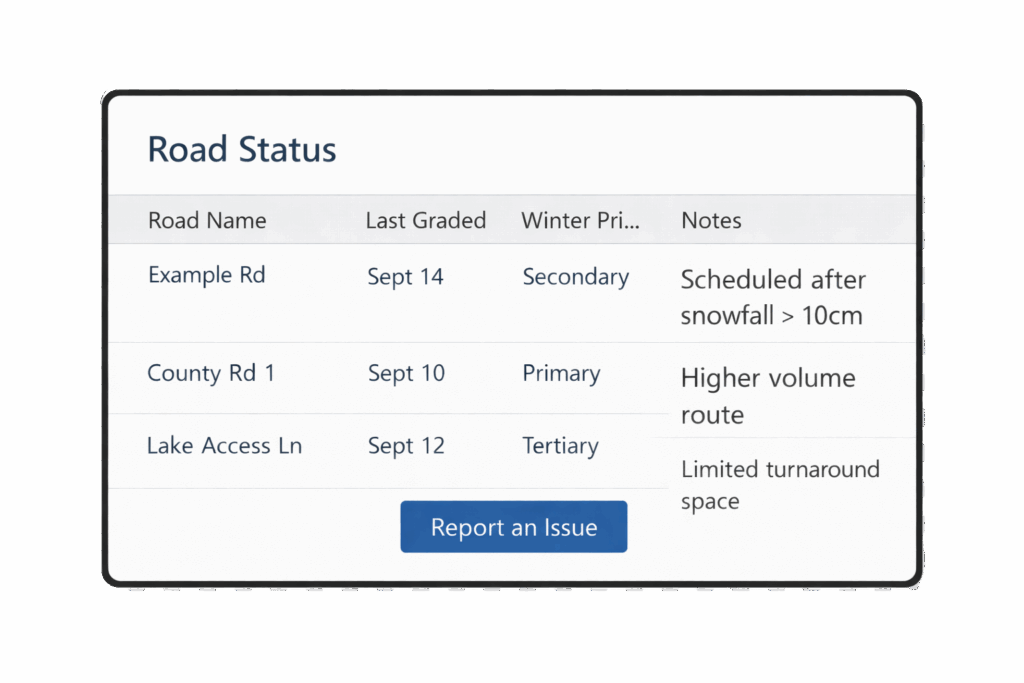
A simple public-facing “Road Maintenance Status” page that clarifies service priorities, recent work, and where to submit issues — using plain language and consistent formatting.
- One page per road (or per area)
- Last service date (graded / plowed / inspected)
- Priority level explained in plain language
- Clear “Report an Issue” path that routes correctly
- Notes section for temporary conditions or known delays
What residents would see
| Road Name | Last Graded | Winter Priority | Notes |
| Example Rd | Sept 14 | Secondary | Scheduled after snowfall >10 cm |
| County Rd 1 | Sept 10 | Primary | Higher volume route |
| Lake Access Ln | Sept 12 | Tertiary | Limited turnaround space |
What this solves
- Sets expectations with clear, consistent info
- Reduces repeat calls and emails
- Improves trust by making constraints visible
- Gives staff a single link to send residents
Why this is realistic
Uses data the municipality already has (or can easily track)
Does not require real-time GPS or live vehicle tracking
Can be implemented in phases
Low risk, high impact improvement
Implementation approach (high level)
- Phase 1: Standardize content and terminology (single template)
- Phase 2: Launch for one service category (e.g., grading)
- Phase 3: Expand to additional categories (plowing, waste, etc.)
- Phase 4: Introduce internal workflows and reporting improvements
This example is intentionally simple — the goal is to demonstrate clarity-first thinking, not to propose a large new system.
Additional Demonstration
This page is intentionally simple.
If requested, additional examples could demonstrate:
- Before/after information restructuring
- Accessibility improvements (contrast, heading order, focus states)
- Mobile-first layout decisions
- Process documentation written for non-technical users
Closing Note
This page was created as a practical example of how digital clarity can support better communication between an organization and the people it serves.
Thank you for taking the time to review it.